Python Youtube MP3 Splitter
A Python program that splits mp3 files from YouTube albums into individual songs.
Dependencies
- Python 2.7+
- ffmpeg
Getting Started
You need to have Python 2.7+ and ffmpeg installed.
Useful links:
Usage
-
Install Python and ffmpeg.
-
Download the album from Youtube as mp3.
(You could use YouTube-dl or any online service).
youtube-dl --extract-audio --audio-format mp3 --audio-quality 0 <Video-URL>
-
Download application.py
-
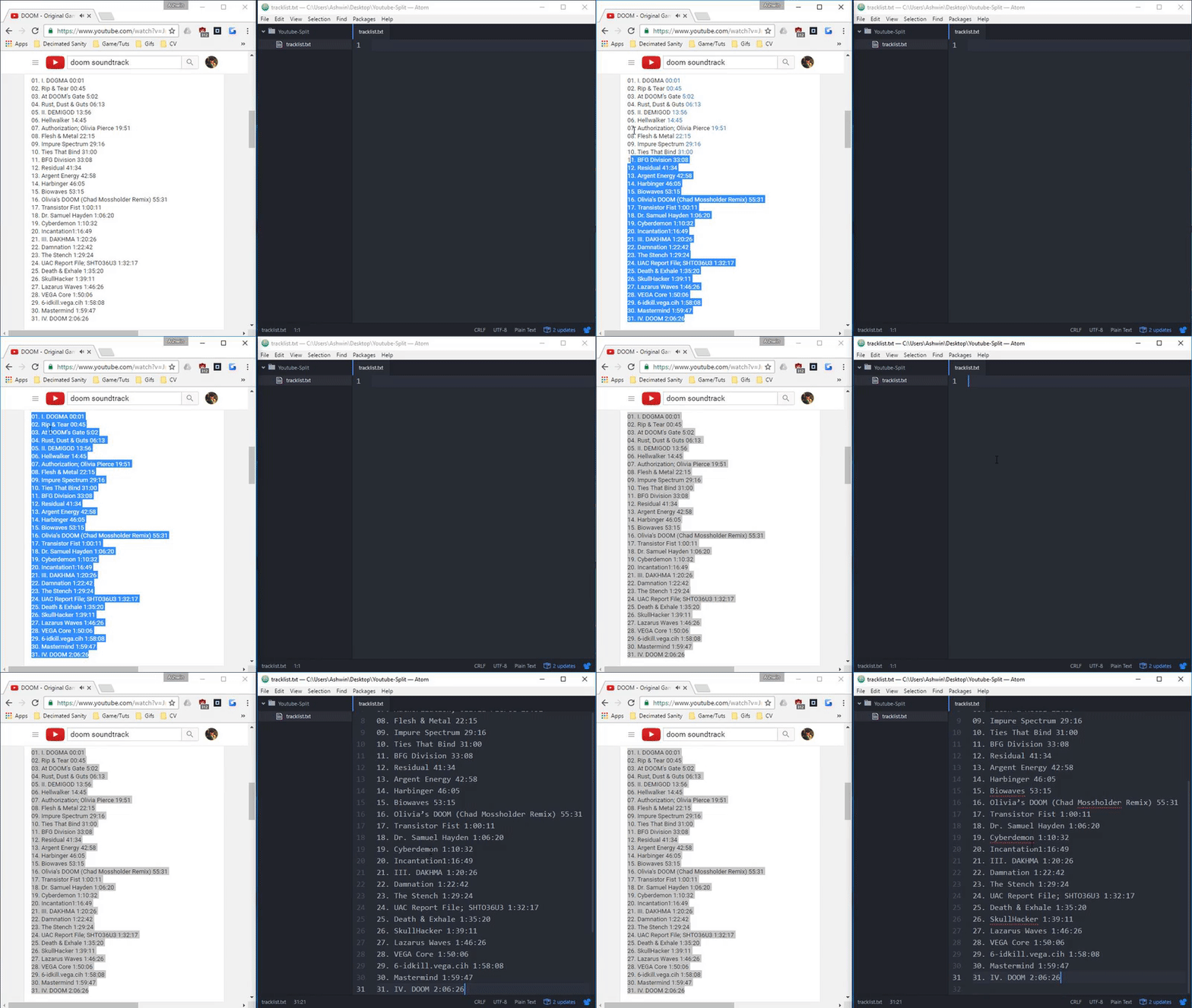
Copy the timestamps into a
.txtfile
-
Run
python application.py <music file.mp3> <tracklist file.txt>
- Enjoy!
import sys
import subprocess

inputfile = sys.argv[1]
codec = '-acodec'

#ffmpeg did not like having '?' in the file name, add any other problematic symbol here.
escape_list = ['?']

def RemoveSymbols(text):
    for symbol in escape_list:
        text = text.replace(symbol, '')
    return text

tracklist = []

class Track:
    def __init__(self, timestamp, name):
        self.timestamp = timestamp
        self.name = name

class ExtractTracks:
    def __init__(self):
        with open(sys.argv[2], "r") as values:
            for value in values:
                name = ""
                timestamp = ""
                #split all by spaces.
                keyVal = value.split(' ')
                #find timestamp
                for word in keyVal:
                    if ':' in word:
                        timestamp = word
                    else:
                        name += word + ' '
                tracklist.append(Track(timestamp, name))

#Initialize
ExtractTracks()


def GenerateSplitCommand(start, end, filename):
    return ['ffmpeg', '-i', inputfile, '-ss', start, '-to', end, '-c', 'copy', filename+'.mp3', '-v', 'error']

def GetVideoEnd():
    ffprobeCommand = [
        'ffprobe',
        '-v',
        'error',
        '-show_entries',
        'format=duration',
        '-of',
        'default=noprint_wrappers=1:nokey=1',
        '-sexagesimal',
        inputfile
    ]
    return subprocess.check_output(ffprobeCommand).strip()

for i in range(0, len(tracklist)):
    name = tracklist[i].name.strip()
    name = RemoveSymbols(name)
    startTime = tracklist[i].timestamp.strip()
    if i != (len(tracklist) - 1):
        endTime = tracklist[i+1].timestamp.strip() #- startTime
    else:
        endTime = GetVideoEnd() #- startTime
    print('---')
    print('Generating ' + name + ' from ' + startTime + ' to ' + endTime)
    print('---')
    command = GenerateSplitCommand(str(startTime), str(endTime), name)
    output = subprocess.check_call(command)
Super Simple Python Timer
Timer module for python to measure elapsed time.
Import
Copy Timer.py to the same folder as your python files.
Linux
wget "https://gist.githubusercontent.com/Ashwinning/313a4bed6af3f7599ac168c4de82b555/raw/Timer.py"
Windows
Invoke-WebRequest https://gist.githubusercontent.com/Ashwinning/313a4bed6af3f7599ac168c4de82b555/
raw/Timer.py -OutFile Timer.py
Usage
from Timer import Timer
timer = Timer() #Initialize the timer
#wash clothes for 5 seconds
timer.print_time() #Print the time elapsed since Initialization (in seconds)
#dry clothes for 3 seconds
timer.print_new_time() #Print the time elapsed since Initialization and reset the timer
#burn clothes for 10 seconds
print (str('Burnt clothes for ' + str(timer.get_time() + ' seconds.')))
Output
>>> 5
>>> 8
>>> Burnt clothes for 10 seconds.
API
-
get_time()
Returns the time elapsed (Does not reset the counter).
-
get_new_time()
Returns the time elapsed and resets the counter.
-
print_time()
Prints the time elapsed (Does not reset the counter).
-
print_new_time()
Prints the time elapsed and resets the counter.
-
get_time_hhmmss()
Returns the time elapsed in HH:mm:ss (Does not reset the counter).
Acknowledgements
Forked from code at http://stackoverflow.com/a/35199035/2899995
import time

class Timer:
    def __init__(self):
        self.start = time.time()

    '''
    Restarts the timer.
    '''
    def restart(self):
        self.start = time.time()


    '''
    Returns the time elapsed and resets the counter.
    '''
    def get_new_time(self):
        value = time.time() - self.start
        self.restart()
        return value


    '''
    Prints the time elapsed and resets the counter.
    '''
    def print_new_time(self):
        print (self.get_new_time())


    '''
    Returns the time elapsed (Does not reset the counter).
    '''
    def get_time(self):
        return time.time() - self.start
        self.restart()


    '''
    Prints the time elapsed (Does not reset the counter).
    '''
    def print_time(self):
        print(get_time)


    '''
    Returns the time elapsed in HH:mm:ss (Does not reset the counter).
    '''
    def get_time_hhmmss(self):
        end = time.time()
        m, s = divmod(end - self.start, 60)
        h, m = divmod(m, 60)
        time_str = "%02d:%02d:%02d" % (h, m, s)
        return time_str